第 6 章:事件与 Epoching
有了干净、已滤波的连续数据,现在我们可以把它切成短小的试次片段(Epochs)—— 一切关于 ERP 的分析都建立在这上面。本章讲解如何查找事件,以及如何正确构建 Epochs。
import mne
import matplotlib.pyplot as plt
from pathlib import Path

mne.set_log_level("WARNING")

sample_folder = Path(mne.datasets.sample.data_path()) / "MEG" / "sample"
raw = mne.io.read_raw_fif(sample_folder / "sample_audvis_raw.fif", preload=True)

# 在丢弃刺激通道之前先查找事件 -- 我们需要它来找出触发点
events = mne.find_events(raw, stim_channel="STI 014")

raw.pick(["eeg", "eog"])
raw.filter(l_freq=1.0, h_freq=40.0)
print("找到的事件数量:", len(events))
print(events[:10])
找到的事件数量: 320
[[27977     0     2]
 [28345     0     3]
 [28771     0     1]
 [29219     0     4]
 [29652     0     2]
 [30025     0     3]
 [30450     0     1]
 [30839     0     4]
 [31240     0     2]
 [31665     0     3]]
两种查找事件的方式
正如第 3 章提到的,事件会出现在两个地方之一:
# 方法一:专门的刺激/触发通道(本数据集)
events = mne.find_events(raw, stim_channel="STI 014")

# 方法二:附加在文件上的标注(annotations,你自己的 .edf 记录)
events, event_id = mne.events_from_annotations(raw)
不管用哪种方法,最终得到的都是一个 events 数组:每行代表一个事件,包含 [采样点编号, 0, 事件编码] 三列。event_code(事件编码)只是一个整数 —— 我们通过一个 event_id 字典,赋予它可读的含义。
# 本数据集的事件编码,MNE 文档中已有记录:
event_id = {
    "auditory/left": 1,
    "auditory/right": 2,
    "visual/left": 3,
    "visual/right": 4,
    "smiley": 5,
    "button": 32,
}

fig = mne.viz.plot_events(events, sfreq=raw.info["sfreq"], event_id=event_id)
plt.show()
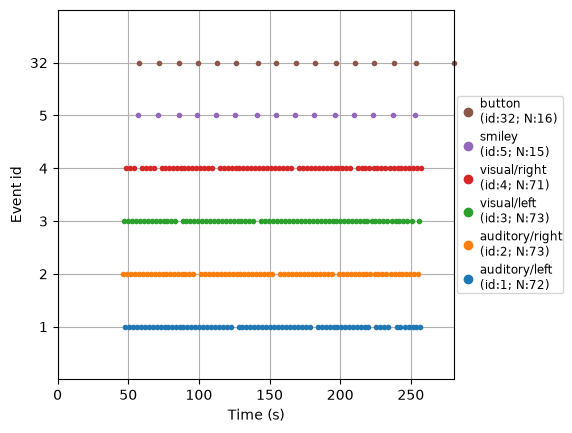
注意像 "auditory/left" 这样的名字里有一个 /。MNE 会把它当作层级结构来处理:之后,epochs["auditory"] 会同时选中 auditory/left 和 auditory/right,而 epochs["auditory/left"] 则只选中那一个。这纯粹是你在构建 event_id 时自己选择的命名约定 —— 可以用它来把相关的条件归为一组。
创建 Epochs
mne.Epochs 会在每个事件周围切出一个固定的时间窗口。关键参数:
tmin、tmax:相对事件的窗口边界,单位是秒(例如-0.2到0.5表示事件前 200 ms 到事件后 500 ms)。baseline:一个时间窗口(通常是事件前的时段),它的均值会从每个通道中减去 —— 用来修正任意的电压偏移,使各个 epoch 之间可以比较。(-0.2, 0.0)是常见的选择。reject:一个字典,给出各通道类型的峰峰值幅度阈值;任何超过阈值的 epoch 都会被自动丢弃 —— 这是对付 ICA 没能清理干净的伪迹的一道简单但有效的第二道防线。preload:含义和Raw中一样 —— 立即加载数据。
epochs = mne.Epochs(
    raw,
    events,
    event_id=event_id,
    tmin=-0.2,
    tmax=0.5,
    baseline=(-0.2, 0.0),
    preload=True,
    reject=dict(eeg=150e-6, eog=250e-6),
)
epochs
| General | ||
|---|---|---|
| MNE object type | Epochs | |
| Measurement date | 2002-12-03 at 19:01:10 UTC | |
| Participant | Unknown | |
| Experimenter | MEG | |
| Acquisition | ||
| Total number of events | 300 | |
| Events counts |
auditory/left: 63
auditory/right: 69 button: 16 smiley: 15 visual/left: 72 visual/right: 65 |
|
| Time range | -0.200 – 0.499 s | |
| Baseline | -0.200 – 0.000 s | |
| Sampling frequency | 600.61 Hz | |
| Time points | 421 | |
| Metadata | No metadata set | |
| Channels | ||
| EEG | and | |
| EOG | ||
| Head & sensor digitization | 146 points | |
| Filters | ||
| Highpass | 1.00 Hz | |
| Lowpass | 40.00 Hz | |
检查哪些 epoch 被丢弃了
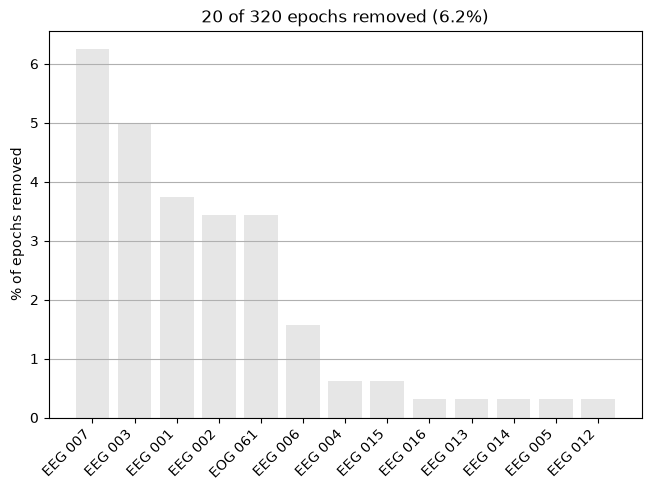
reject 阈值会自动丢弃受污染的 epoch。务必检查丢弃了多少、以及为什么 —— 如果丢弃的比例过大,说明你的阈值设置得太严格了(或者说明上游的伪迹清理步骤还需要改进)。
print(epochs.drop_log_stats(), "% 的 epoch 被丢弃")
epochs.plot_drop_log()
plt.show()
6.25 % 的 epoch 被丢弃
选择与浏览 epoch
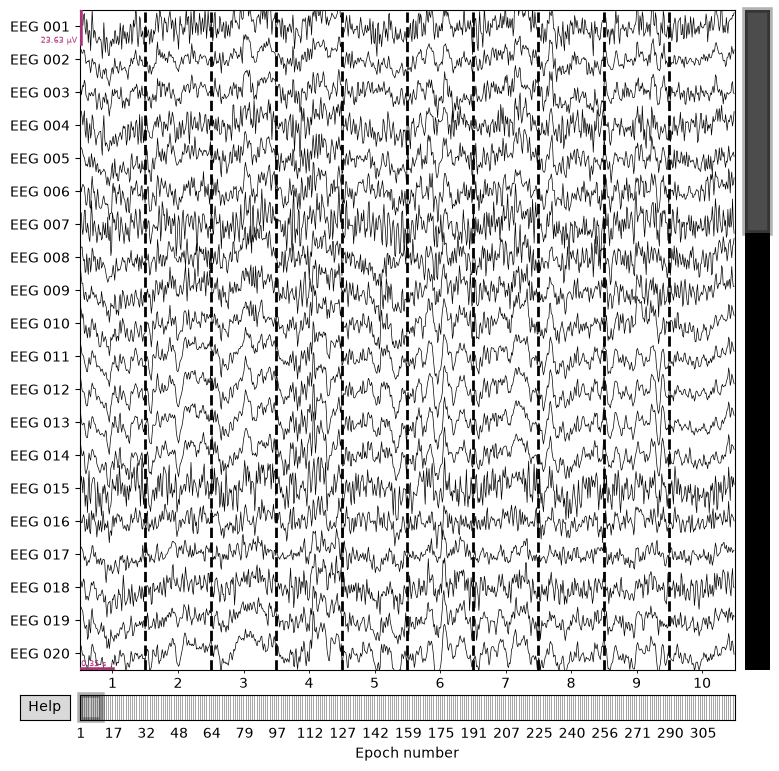
用条件名称(也就是 event_id 中的标签)来索引,并像浏览 raw.plot() 一样,逐个浏览单个试次。
print("所有听觉试次(左 + 右):", len(epochs["auditory"]))
print("仅 auditory/left:", len(epochs["auditory/left"]))

epochs.plot(n_epochs=10, scalings="auto")
plt.show()
所有听觉试次(左 + 右): 132
仅 auditory/left: 63
保存 epochs(可选)
对一个满意的 Epochs 对象,你可以把它保存下来,下次就不用重新跑一遍整个流程:
epochs.save("my-epo.fif", overwrite=True)
epochs = mne.read_epochs("my-epo.fif")
-epo.fif 这种命名约定是 MNE 的硬性要求,不只是建议。)
小结
- 事件来自刺激通道(
mne.find_events)或标注(mne.events_from_annotations)。 event_id把可读的条件名称(可以用/表示层级)映射到整数编码。mne.Epochs(raw, events, event_id, tmin, tmax, baseline, reject)切分并清理试次片段。- 应用拒绝阈值之后,务必检查
epochs.plot_drop_log()。
下一章:第 7 章 —— ERP 分析 —— 把这些 epoch 平均成 ERP 本身。