Chapter 0: Getting Started — Python & Jupyter Basics
This tutorial assumes no prior knowledge of Python or EEG. Chapters 1–8 teach the EEG/MNE side. This chapter teaches just enough Python to read every line of code you'll see there — nothing more. If you've written Python before, skip straight to Chapter 1. (Prefer to click through a GUI before writing code? See the optional MNELAB companion guide, which walks the same workflow this tutorial teaches.)
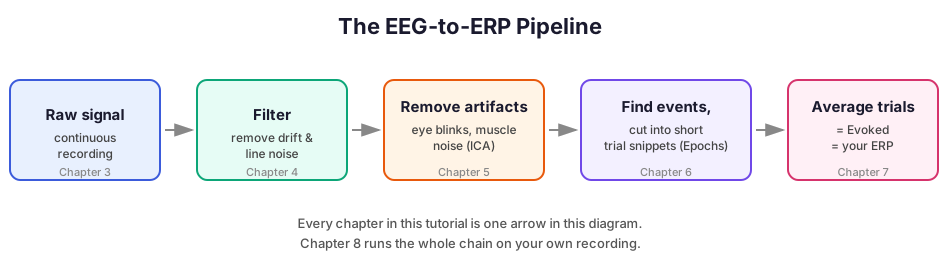
Roadmap of the whole tutorial, for orientation:
What is a Jupyter notebook?
This file is a notebook — a document made of cells. There are two kinds:
- Markdown cells (like this one): formatted text, for explanations. Not run, just read.
- Code cells: actual Python instructions. You run them, and see their output appear directly underneath.
In VS Code, click into a code cell and press Shift+Enter to run it (this also moves you to the next cell). Try it on the cell below.
print("If you can see this line appear below the cell, it worked.")
If you can see this line appear below the cell, it worked.
Important: cells share memory with each other, in the order you run them (not necessarily the order they appear on the page). If cell A creates something and cell B below it uses that something, you must run A before B. If output ever looks wrong or a name seems "missing," the usual fix is: re-run cells from the top. In VS Code's notebook toolbar, "Restart" resets everything back to a blank slate; "Run All" then re-runs every cell top to bottom, in order — the most reliable way to make sure everything is consistent.
What is Python?
Python is a programming language — a way of writing precise, step-by-step instructions for a computer to carry out. You write instructions as text; the computer reads them top to bottom and does exactly what they say. That's really the whole idea. Everything below is just vocabulary for reading those instructions.
Variables: named boxes that hold a value
x = 5 means: create a box labeled x, and put 5 inside it. From then on, writing x anywhere means "whatever is currently in that box".
x = 5
y = 3
print(x + y)  # everything after a # is a comment -- a note for humans, Python ignores it
8
The few data types you'll actually see in this tutorial
- Numbers:
5,1.0,40.0 - Strings (text): always in quotes, e.g.
"eeg","auditory/left" - Lists: an ordered sequence, written with square brackets:
["Fz", "Cz", "Pz"]. Get one item out with[index], counting from 0, so the first item ismylist[0]. - Dictionaries: a lookup table of
key: valuepairs, written with curly braces:{"auditory/left": 1, "auditory/right": 2}. Get a value out withmydict["key"]. You'll see this exact pattern constantly asevent_idin Chapter 6.
channel_names = ["Fz", "Cz", "Pz"]
print("first channel:", channel_names[0])

event_id = {"auditory/left": 1, "auditory/right": 2}
print("code for auditory/left:", event_id["auditory/left"])
first channel: Fz
code for auditory/left: 1
Calling functions
A function is a pre-packaged action you can trigger by writing its name followed by parentheses, e.g. print(...). Whatever's inside the parentheses is input to that action — an argument.
Many functions accept keyword arguments — arguments given a name, as name=value, so their meaning is unambiguous and their order doesn't matter:
print("hello", "world", sep=" ... ") # `sep` is a keyword argument controlling what goes between items
hello ... world
You'll see this exact style everywhere in later chapters, e.g. raw.filter(l_freq=1.0, h_freq=40.0) — l_freq=1.0 and h_freq=40.0 are keyword arguments naming exactly which cutoff is which, so there's no ambiguity about which number means what.
Objects and methods (the single most important pattern to recognize)
Almost every line of MNE code you'll write looks like something.do_a_thing(...). That dot is doing something specific: something is an object — a bundle that carries both data and built-in actions it knows how to perform on itself. An action attached to an object like this is called a method, and you trigger it the same way as a function, just after a dot.
Here's the pattern with something you already know — text (a string) is an object too, and it has methods:
greeting = "hello world"
print(greeting.upper())  # .upper() is a method that string objects know how to do to themselves
HELLO WORLD
In later chapters, raw is an object representing your EEG recording, and it has methods like raw.filter(...) ("filter yourself"), raw.plot() ("draw yourself"), and raw.copy() ("give me a duplicate of yourself"). Once you see it this way, code like
raw_filtered = raw.copy().filter(l_freq=1.0, h_freq=40.0)
raw, make a copy of it, then filter that copy, and call the result raw_filtered."
Importing libraries
A library is a big pre-written collection of code someone else wrote and published, so you don't have to reinvent it. mne is the EEG/MEG library this whole tutorial is built on; matplotlib handles plotting. You bring a library into your notebook with import, then access anything inside it with a dot, e.g. mne.io.read_raw_edf(...) means "inside the mne library, inside its io section, use the function read_raw_edf."
import mne

print("mne library version:", mne.__version__)
mne library version: 1.12.1
Reading error messages without panicking
You will hit red error text. That's normal, not a sign you broke something permanently. Python shows a traceback: the chain of code that led to the problem, ending in the actual error. The habit that matters: read the very last line first — it names the error type and usually explains exactly what went wrong. The lines above it just show where in the code it happened, useful mainly once you already know what the error means.
Example of what one looks like (this is sample output, not something you need to run):
Traceback (most recent call last):
  File "<cell>", line 1, in <module>
    event_id["typo_condition"]
KeyError: 'typo_condition'
KeyError: 'typo_condition' means "you asked this dictionary for a key that doesn't exist, named typo_condition" — almost always a typo or a wrong assumption about what's in there, both very fixable.
Cheat sheet
Keep this nearby while reading Chapters 1–8 — it covers essentially every syntax pattern you'll encounter.
| You'll see | It means |
|---|---|
x = 5 |
store a value in a variable named x |
# some text |
a comment — a note for humans, ignored by Python |
"some text" |
a string (text) value |
[a, b, c] |
a list — an ordered sequence; mylist[0] gets the first item |
{"key": value} |
a dictionary — a lookup table; mydict["key"] gets that entry's value |
some_function(arg) |
call a function, passing arg as input |
some_function(name=value) |
call a function with a named ("keyword") argument |
object.method(...) |
tell object to perform its built-in method action |
object.copy() |
get an independent duplicate, leaving the original untouched |
import library |
load a pre-written code library, e.g. import mne |
library.thing |
access thing inside library |
| red traceback text | an error — read the last line first |
You now know enough Python to read every code cell in this tutorial. From here on, explanations focus entirely on EEG and MNE — when you see unfamiliar syntax, it'll be one of the patterns from the cheat sheet above.