Chapter 7: From Menu to Script: The History Panel
Continuing from Chapter 6 — ERP Analysis. This is the final chapter of the MNELAB companion guide.
You've now clicked through the same load → preprocess → ICA → epoch → average workflow the main MNE-Python track teaches as code. This closing chapter shows the feature that ties the two together directly: MNELAB's History panel.
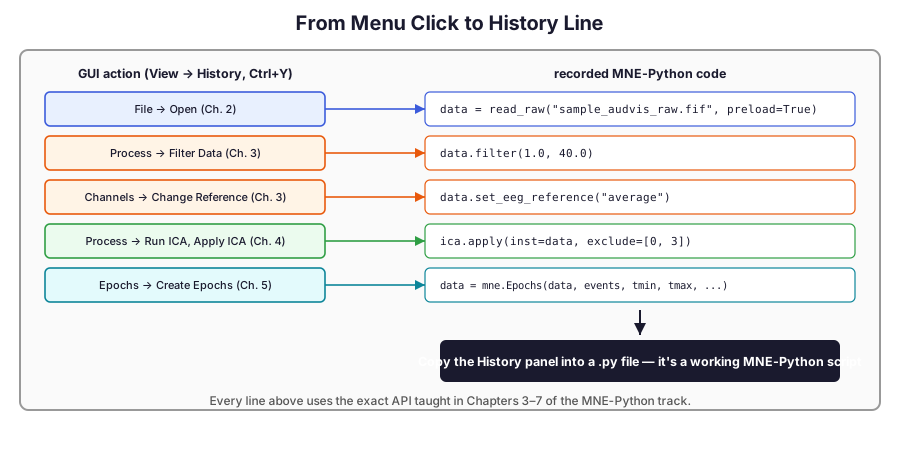
Opening the History panel
View → History (or Ctrl+Y) opens a panel that has been quietly recording every single action you've taken since MNELAB launched — and not as a vague description, but as the exact MNE-Python code that action just ran. This is one of MNELAB's central features: it exists specifically, in its author's words, to help you "discover which functions correspond to previous actions" and "reproduce your analyses in code" (Brunner, 2022, Journal of Open Source Software).
A worked example
Working through Chapters 2–5 of this guide on the sample recording leaves a History panel that reads something like this:
data = read_raw("sample_audvis_raw.fif", preload=True)
data.filter(1.0, 40.0)
data.set_eeg_reference("average")
ica.apply(inst=data, exclude=[0, 3])
events, _ = mne.events_from_annotations(data)
data = mne.Epochs(data, events[np.isin(events[:, 2], [1, 2, 3])],
                   tmin=-0.2, tmax=0.5, baseline=(None, 0), preload=True)
Every line here is exactly the API taught in Chapters 3–7 of the main MNE-Python track — filter(), set_eeg_reference(), ica.apply(), events_from_annotations(), and mne.Epochs(). Nothing was translated or approximated; the History panel is a direct transcript.
Why there's no format bridge here
The Brainstorm and EEGLAB & ERPLAB tracks each end with a chapter about crossing a real file-format boundary back into MNE-Python — reading a .set file, or exporting to FieldTrip-compatible .mat. MNELAB doesn't need one: it already is MNE-Python, so there's nothing to import. The History panel's contents can be pasted directly into a .py file or a notebook cell and run as-is — no reader function required, because nothing ever left MNE-Python's own object model in the first place.
Where to go next
From here, continuing on your own recording is exactly the MNE-Python track's Apply This to Your Own Data template — many readers find it easiest to explore a new dataset in MNELAB first, copy the relevant lines out of its History panel, and use them as the starting point for that template rather than writing every call from memory.
That's the end of the MNELAB companion guide — thanks for reading.