Chapter 6: Source Localization
Continuing from Chapter 5 — Sensor-Level Analysis.
This is the analysis Brainstorm is best known for: estimating where in the brain a recorded signal came from, rather than only what a sensor on the scalp picked up.
The pipeline
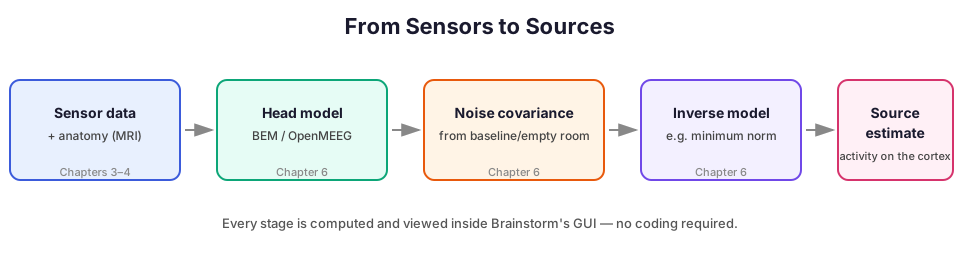
- Head model — a physical model of how electrical/magnetic activity travels from the cortex to the sensors. For EEG this is usually a Boundary Element Model (BEM) computed with the OpenMEEG toolbox, built into Brainstorm; a simpler "overlapping spheres" model is also available and is common for MEG.
- Noise covariance — an estimate of the sensors' background noise, computed from a baseline period of your recording or from a separate empty-room/resting recording. This tells the next step how much to trust each sensor.
- Inverse model — combining the head model and noise covariance to solve the "inverse problem": which pattern of activity on the cortex would best explain the sensor data? Brainstorm offers several standard methods (minimum norm estimation, dSPM, sLORETA) as process options.
- Source estimate — the result: an estimate of activity at each point on the cortical surface, over time, viewable and scrollable in 3D.
Running it
Each of the three computation steps (head model, noise covariance, inverse model) is its own process, run the same way as every other process in this track: select the relevant files, drag into Process1, pick the process, set parameters, click Run. Brainstorm walks you through each with a guided dialog rather than requiring you to know the underlying parameter names in advance.
Viewing the result
Double-clicking a source estimate file opens Brainstorm's 3D cortex viewer: a folded brain surface colored by estimated activity, with a time slider so you can scrub through and watch activity move across the cortex. You can rotate the view, switch between inflated and folded surface representations, and export a still image or an animation.
If this pipeline sounds familiar, it should: it mirrors exactly what mne.make_bem_model, mne.compute_covariance, and mne.minimum_norm do in MNE-Python — same underlying math, GUI dialogs here instead of function arguments.