Chapter 6: Events and Epoching
With clean, filtered continuous data, we can now cut it into the short trial snippets (Epochs) that everything about ERPs is built from. This chapter covers finding events and constructing Epochs properly.
import mne
import matplotlib.pyplot as plt
from pathlib import Path

mne.set_log_level("WARNING")

sample_folder = Path(mne.datasets.sample.data_path()) / "MEG" / "sample"
raw = mne.io.read_raw_fif(sample_folder / "sample_audvis_raw.fif", preload=True)

# find events BEFORE dropping the stim channel -- we need it to find the triggers
events = mne.find_events(raw, stim_channel="STI 014")

raw.pick(["eeg", "eog"])
raw.filter(l_freq=1.0, h_freq=40.0)
print("Number of events found:", len(events))
print(events[:10])
Number of events found: 320
[[27977     0     2]
 [28345     0     3]
 [28771     0     1]
 [29219     0     4]
 [29652     0     2]
 [30025     0     3]
 [30450     0     1]
 [30839     0     4]
 [31240     0     2]
 [31665     0     3]]
Two ways to find events
As covered in Chapter 3, events live in one of two places:
# Method 1: a dedicated stim/trigger channel (this dataset)
events = mne.find_events(raw, stim_channel="STI 014")

# Method 2: annotations attached to the file (your own .edf recording)
events, event_id = mne.events_from_annotations(raw)
Either way, you end up with an events array: one row per event, with columns [sample_number, 0, event_code]. event_code is just an integer — we attach human-readable meaning via an event_id dictionary.
# This dataset's event codes are documented by MNE:
event_id = {
    "auditory/left": 1,
    "auditory/right": 2,
    "visual/left": 3,
    "visual/right": 4,
    "smiley": 5,
    "button": 32,
}

fig = mne.viz.plot_events(events, sfreq=raw.info["sfreq"], event_id=event_id)
plt.show()
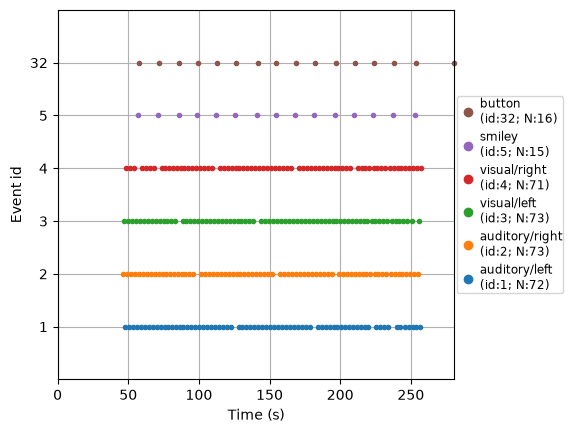
Notice the / in names like "auditory/left". MNE treats this as hierarchical: later, epochs["auditory"] selects both auditory/left and auditory/right together, while epochs["auditory/left"] selects just that one. This is purely a naming convention you choose when building event_id — use it to group related conditions.
Creating Epochs
mne.Epochs cuts a fixed time window around every event. Key parameters:
tmin,tmax: window bounds relative to the event, in seconds (e.g.-0.2to0.5= 200 ms before to 500 ms after).baseline: a time window (usually the pre-event period) whose mean is subtracted from every channel — corrects for arbitrary voltage offsets so epochs are comparable.(-0.2, 0.0)is a typical choice.reject: a dict of peak-to-peak amplitude thresholds per channel type; any epoch exceeding it is dropped automatically — a blunt but effective second line of defense against artifacts ICA missed.preload: same meaning as forRaw— load the data immediately.
epochs = mne.Epochs(
    raw,
    events,
    event_id=event_id,
    tmin=-0.2,
    tmax=0.5,
    baseline=(-0.2, 0.0),
    preload=True,
    reject=dict(eeg=150e-6, eog=250e-6),
)
epochs
| General | ||
|---|---|---|
| MNE object type | Epochs | |
| Measurement date | 2002-12-03 at 19:01:10 UTC | |
| Participant | Unknown | |
| Experimenter | MEG | |
| Acquisition | ||
| Total number of events | 300 | |
| Events counts |
auditory/left: 63
auditory/right: 69 button: 16 smiley: 15 visual/left: 72 visual/right: 65 |
|
| Time range | -0.200 – 0.499 s | |
| Baseline | -0.200 – 0.000 s | |
| Sampling frequency | 600.61 Hz | |
| Time points | 421 | |
| Metadata | No metadata set | |
| Channels | ||
| EEG | and | |
| EOG | ||
| Head & sensor digitization | 146 points | |
| Filters | ||
| Highpass | 1.00 Hz | |
| Lowpass | 40.00 Hz | |
Checking what got dropped
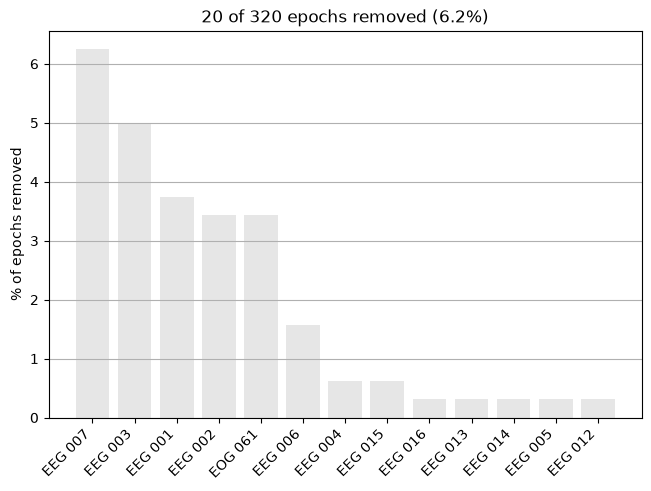
The reject threshold discards contaminated epochs automatically. Always check how many, and why — dropping too large a fraction of trials is a sign your threshold is too strict (or an artifact-cleaning step upstream needs work).
print(epochs.drop_log_stats(), "% of epochs dropped")
epochs.plot_drop_log()
plt.show()
6.25 % of epochs dropped
Selecting and browsing epochs
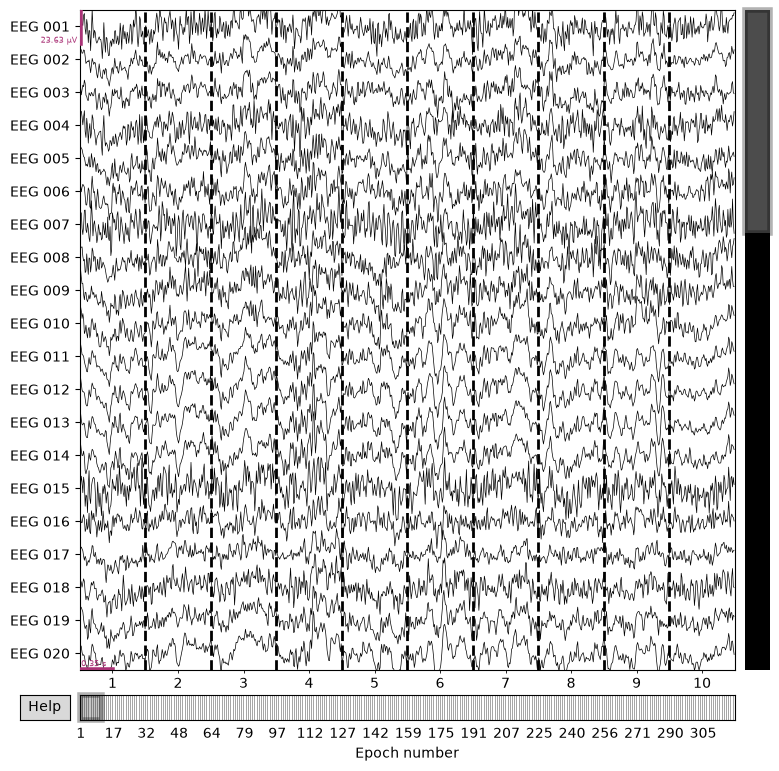
Index by condition name (using the event_id labels), and browse individual trials the same way you'd browse raw.plot().
print("All auditory trials (left + right):", len(epochs["auditory"]))
print("Just auditory/left:", len(epochs["auditory/left"]))

epochs.plot(n_epochs=10, scalings="auto")
plt.show()
All auditory trials (left + right): 132
Just auditory/left: 63
Saving epochs (optional)
Once you're happy with an Epochs object, you can save it to skip re-running the whole pipeline next time:
epochs.save("my-epo.fif", overwrite=True)
epochs = mne.read_epochs("my-epo.fif")
-epo.fif naming convention is an MNE requirement, not just a suggestion.)
Summary
- Events come from either a stim channel (
mne.find_events) or annotations (mne.events_from_annotations). event_idmaps human-readable condition names (optionally hierarchical with/) to integer codes.mne.Epochs(raw, events, event_id, tmin, tmax, baseline, reject)cuts and cleans the trial snippets.- Always check
epochs.plot_drop_log()after applying rejection thresholds.
Next: Chapter 7 — ERP Analysis — averaging these epochs into the ERP itself.