Chapter 2: MNE-Python Core Concepts
MNE-Python is the standard open-source Python library for MEG/EEG analysis — most published EEG papers using Python use it. Its official documentation and tutorials live at mne.tools; everything in this tutorial series is grounded in that documentation, adapted for a first pass.
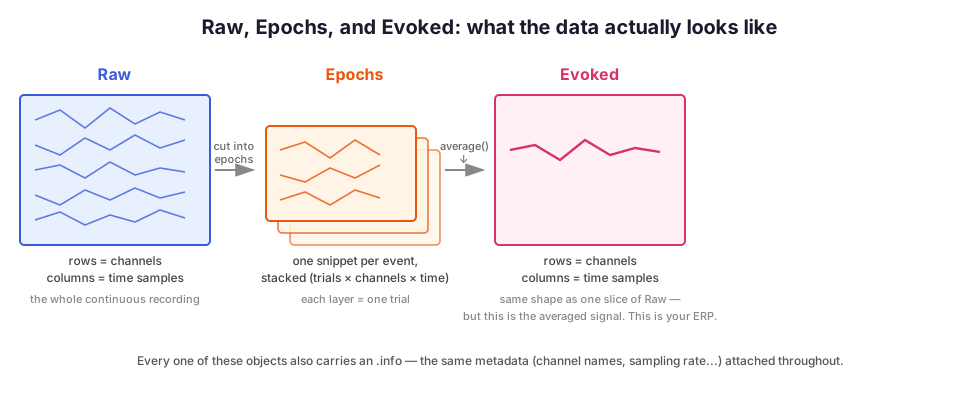
Almost everything you'll do in MNE revolves around four object types. Learn these and the rest of the library reads naturally, because every function's job is to create, transform, or extract information from one of them.
The four core objects
| Object | Shape of underlying data | What it represents |
|---|---|---|
Info |
(metadata only) | Channel names/types, sampling rate, filter history, bad channels, montage — the "header" describing a recording |
Raw |
(n_channels, n_times) |
The full continuous recording |
Epochs |
(n_epochs, n_channels, n_times) |
Many short snippets cut around events |
Evoked |
(n_channels, n_times) |
The average across epochs — this is your ERP |
Every Raw, Epochs, and Evoked object carries an .info attribute — the same kind of metadata container, describing whatever data that object holds. Once you've inspected .info once, you know how to inspect it on any of the three.
Let's load real data (the public sample dataset from the previous chapters) and look at each.
import mne
from pathlib import Path

mne.set_log_level("WARNING")

sample_folder = Path(mne.datasets.sample.data_path()) / "MEG" / "sample"
raw = mne.io.read_raw_fif(sample_folder / "sample_audvis_raw.fif", preload=True)
raw.pick(["eeg", "eog"])  # keep this tutorial EEG-focused, like your own data
raw
| General | ||
|---|---|---|
| Filename(s) | sample_audvis_raw.fif | |
| MNE object type | Raw | |
| Measurement date | 2002-12-03 at 19:01:10 UTC | |
| Participant | Unknown | |
| Experimenter | MEG | |
| Acquisition | ||
| Duration | 00:04:38 (HH:MM:SS) | |
| Sampling frequency | 600.61 Hz | |
| Time points | 166,800 | |
| Channels | ||
| EEG | and | |
| EOG | ||
| Head & sensor digitization | 146 points | |
| Filters | ||
| Highpass | 0.10 Hz | |
| Lowpass | 172.18 Hz | |
Info: the metadata
raw.info behaves like a dictionary. Some of the most useful keys:
print("Sampling rate:", raw.info["sfreq"])
print("Number of channels:", raw.info["nchan"])
print("Bad channels:", raw.info["bads"])
print("Highpass/lowpass already applied:", raw.info["highpass"], raw.info["lowpass"])
raw.info  # printing it directly gives a full readable summary
Sampling rate: 600.614990234375
Number of channels: 61
Bad channels: ['EEG 053']
Highpass/lowpass already applied: 0.10000000149011612 172.17630004882812
| General | ||
|---|---|---|
| MNE object type | Info | |
| Measurement date | 2002-12-03 at 19:01:10 UTC | |
| Participant | Unknown | |
| Experimenter | MEG | |
| Acquisition | ||
| Sampling frequency | 600.61 Hz | |
| Channels | ||
| EEG | and | |
| EOG | ||
| Head & sensor digitization | 146 points | |
| Filters | ||
| Highpass | 0.10 Hz | |
| Lowpass | 172.18 Hz | |
Raw: the continuous recording
Underneath, Raw wraps a plain 2D NumPy array: rows are channels, columns are time samples. You can get that array directly with .get_data() — useful to remember that everything MNE does is ultimately array math with metadata attached.
data = raw.get_data()
print("data shape (channels, time samples):", data.shape)
print("data is in Volts by default; e.g. first channel, first 5 samples:", data[0, :5])
data shape (channels, time samples): (61, 166800)
data is in Volts by default; e.g. first channel, first 5 samples: [1.13989260e-05 9.85015885e-06 7.68188489e-06 5.82336435e-06
 6.81457530e-07]
Code patterns you'll see constantly
A few conventions come up everywhere in MNE — recognizing them now will save confusion later:
1. Many methods modify the object in place (and also return it, to allow chaining) — raw.filter(...) changes raw itself. If you want to keep the original untouched, .copy() first:
raw_filtered = raw.copy().filter(l_freq=1, h_freq=40)  # raw itself is untouched
raw.filter(l_freq=1, h_freq=40)                         # raw itself IS modified
raw_filt = raw.copy().filter(...)) specifically so the unfiltered raw stayed available for comparison.
2. preload: reading a file with preload=False (sometimes the default) only reads the header/metadata, not the actual signal — faster if you just want to inspect .info or crop before loading everything. Most processing steps require preload=True (either at read time or via raw.load_data() later).
3. picks: many functions accept a picks argument to operate on a subset of channels, e.g. picks="eeg", picks=["Fz", "Cz"], or picks="eog".
4. verbose: almost every function accepts verbose=... to control its own logging independent of the global mne.set_log_level(...) we set above.
Getting help without leaving the notebook
In Jupyter, append ? to any function or method to pop up its docstring (full parameter list, defaults, and explanation) — this is the fastest way to answer "what does this argument do?" without leaving VS Code.
raw.filter?
Summary
Info= metadata, attached to everything.Raw= continuous recording (2D: channels × time).Epochs= trial snippets (3D: trials × channels × time) — Chapter 6.Evoked= the average ofEpochs= your ERP — Chapter 7.- Remember
.copy()before in-place methods,preload=Trueto actually load data,picksto select channels, andfunction?for instant docs.