Chapter 1: Installation and First Launch
Continuing from Chapter 0 — What is EEGLAB & ERPLAB?.
This chapter gets EEGLAB open on your screen, with ERPLAB installed as a plugin inside it.
MATLAB, or no MATLAB?
EEGLAB is written for MATLAB, so the standard route is: install MATLAB (a paid, licensed product; many universities provide free access), then install EEGLAB as a MATLAB toolbox. If you don't have a MATLAB license, EEGLAB also ships standalone, compiled versions for Windows, macOS, and Linux built with MATLAB's Runtime Compiler — these run the full GUI without any license, though they can't run custom MATLAB scripts you write yourself. If your goal is purely to click through EEGLAB and ERPLAB's menus, the standalone version is enough; if you plan to write your own MATLAB analysis scripts on top, you'll need a real MATLAB license.
Installing and launching EEGLAB
- Download EEGLAB from sccn.ucsd.edu/eeglab or its GitHub repository.
- Unzip it anywhere, then in MATLAB add that folder to your path (Home tab → Set Path → Add with Subfolders, or the standalone version's own installer).
- Type
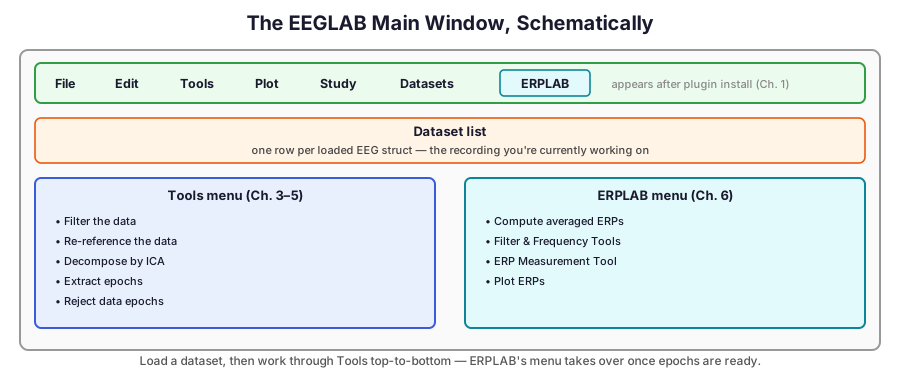
eeglabat the MATLAB command prompt (or launch the standalone app). The main window opens: a menu bar (File, Edit, Tools, Plot, Study, Datasets) above an empty dataset list — nothing is loaded yet, so most menu items stay grayed out until you import a recording in the next chapter.
Installing ERPLAB as a plugin
ERPLAB is installed through EEGLAB, not downloaded separately:
- In the EEGLAB main window: File → Manage EEGLAB extensions.
- Search for "ERPLAB" in the plugin list, select it, and click Install/Update.
- Restart EEGLAB (close and re-run
eeglab). A new ERPLAB menu now appears in the main window's menu bar, alongside File/Edit/Tools/Plot — this is where every ERP-specific step in Chapter 6 lives.
The same extension manager gives access to EEGLAB's much larger plugin catalog — automated cleaning tools like Clean Rigor, component classifiers like ICLabel (used in Chapter 4), source-localization plugins like DIPFIT, and dozens more. Part of EEGLAB's appeal is that this ecosystem keeps growing without needing a new application release.